🎯 Key Takeaway
- Working out how to accept payments on my website starts with how the money arrives, not with software
- A payment link takes a deposit today and needs no store, no cart and no change to your pages
- A hosted checkout keeps the card entry on the provider’s page while the buyer stays on yours
- The route you pick decides your compliance paperwork, because handling card data yourself widens it
- Taking card numbers by email, text or over the phone on paper is the one route to rule out
Most businesses asking this do not need a shop.
The question usually arrives attached to something small and specific. A deposit before a job starts. A balance when it’s finished. What the search results hand back instead is merchant accounts, gateways and platform comparisons, which answers a question about running a shop.
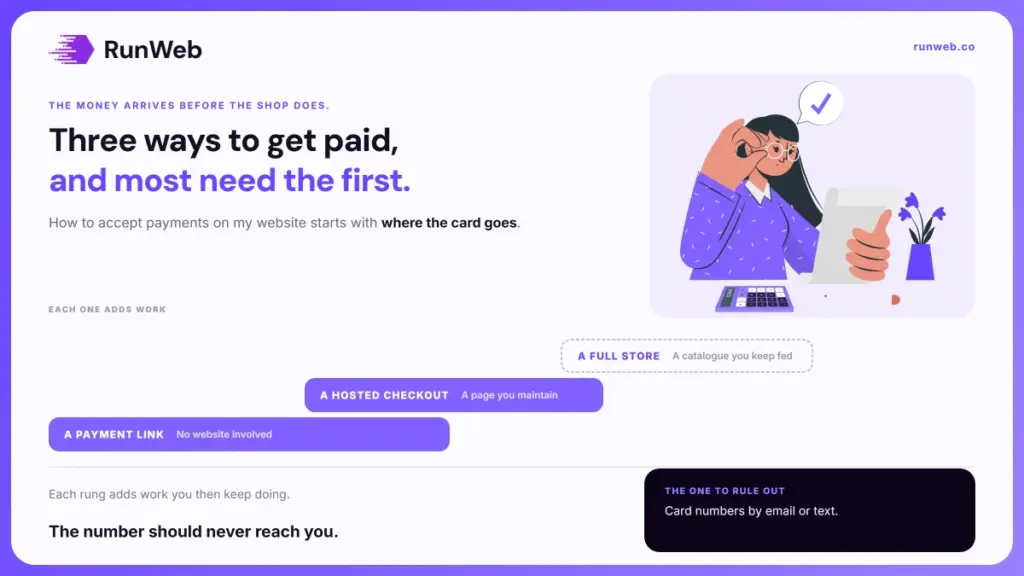
Three routes exist, and each one stacks on the last. Each adds capability, and each adds work you then have to keep doing.
So the first thing to settle is which rung you actually need.
The three routes, and what each adds
Every method comes down to where the buyer types the card number. Nowhere else matters as much. That single fact decides how much you build, how much you maintain and how much of the compliance burden lands on you rather than on your provider.
Because the routes stack rather than compete, the honest comparison is what each one adds to the one below it.
| Route | Where the card is typed | What it adds | What it costs you in work |
|---|---|---|---|
| A payment link | The provider’s page, reached by a link you send | Money today, with no website involved | Creating a link per job |
| A hosted checkout | The provider’s page or a frame inside yours | Buttons on your own pages | A page to maintain, and a payments page to test |
| A full store | The same, inside a shop system | Stock, variants, shipping, tax rules | Ongoing catalogue and order management |
Row one surprises people. And the reason it surprises them is that nobody sells it hard, since a link earns a provider the same fee as a shop while requiring none of the lock-in.
The first rung needs no website change
That first row deserves its own section, because it answers the actual question for a large share of the people asking it. There’s no page to build. A payment link is a web address the provider hosts for you, pointing at a page that collects one specified amount.
Both major providers document it as a no-code product. Stripe describes payment links as a way to take payments without writing code or building a page, and Square publishes the same idea as online checkout links and buttons that work with or without a site.
- Create one for the amount: Set the figure, name it after the job, and the provider generates the address.
- Send it where the customer already is: In the quote email, in a text, or on the invoice itself.
- Add it to your site if you want to: A link becomes a button on any page, which is the whole of the integration.
- Reuse or expire it: A standing link suits a fixed fee, and a single-use one suits a quoted job.
Step two is worth pausing on. Because the payment happens wherever the conversation is happening, a trade taking a deposit over the phone can send the link while the customer is still on the call, which is a shorter path than any website provides.
When the checkout belongs on your own page
Once links stop fitting, the next rung is a checkout that lives on your site. Volume isn’t the trigger. Repetition is, because a link per job stops making sense when the same three services are bought over and over.
The card entry still belongs to the provider in this arrangement. What changes is that the buyer reaches it from your page and returns to your page afterwards.
- A redirect: Your button sends the buyer to the provider’s page and brings them back when it is done.
- An embedded frame: The provider’s form is displayed inside your page, so the buyer never appears to leave.
- Either way, you do not see the number: The card details go to the provider, which is the point of both designs.
- The frame is not free of consequences: Embedding brings your own page’s scripts into the picture, as the next section explains.
The difference between those first two looks cosmetic and is not. A redirect is the simpler arrangement to keep safe, and an embedded frame buys a smoother experience at the price of more responsibility sitting with you, which is a trade worth making knowingly.
When a store earns its keep
That leaves the top rung, and the test for it is not the one people expect. Turnover isn’t the test. Plenty of businesses turning over a good deal never need a shop system, and some very small ones do.
A store earns its place when the things you sell need managing rather than just charging for.
- You have a catalogue that changes: Items come and go, and somebody has to keep the list current.
- Stock has to be counted: Selling the last one twice is a problem a link cannot solve.
- Options change the price: Sizes, quantities and add-ons multiply out past what a fixed link handles.
- Something physical ships: Shipping rules and tax by destination are the real work in a store.
Where none of those four applies, a store is a maintenance commitment bought for nothing. Stores need feeding. An unused one still enlarges the running cost of the site in the way what WordPress costs describes. A catalogue also needs pictures of every item, which brings its own questions about using a stock photo rather than shooting your own.
What the choice decides about your paperwork
Each of those rungs carries an obligation that arrives quietly, and most owners meet it first in a letter from their bank. Card payments are governed by a security standard. There’s no small-business exemption in it.
The council that writes it puts the scope in one sentence on its merchant guidance, saying the standard is intended for all entities involved in payment processing, including merchants, regardless of their size or transaction volume. What differs is not whether it applies but how much you have to demonstrate.
Outsourcing the card entry does not remove the obligation. It shrinks it, by moving the part that carries the risk onto somebody whose job is carrying it.
The council’s own guidance on the shortest self-assessment route is the useful part here, and it draws the line exactly where the previous section did.
- Fully outsourced sites qualify: A site hosted entirely by a compliant provider sits on the shortest route.
- Redirects qualify: A page sending the buyer to the provider counts the same way.
- Frames qualify with a condition: The council’s eligibility guidance adds that a merchant using an embedded frame must confirm the page is not open to script attacks.
- That condition skips redirects: The same guidance states it does not apply to merchants who redirect or fully outsource.
Point three is the reason the redirect deserves a second look. Where nobody at your business is going to audit the scripts running on a page, choosing the route that never asks you to is the sensible call rather than the timid one.
The route to rule out
All three rungs share one thing, which is that the number never reaches you. That’s the whole principle. The arrangement to rule out is the informal one that businesses fall into precisely because it needs no setup at all.
- Card numbers by email or text: The message sits in two inboxes, on two phones and in a backup, and every one of those becomes yours to protect.
- Numbers written on a job sheet: Paper in a van is card data storage, and it is the version nobody thinks of as storage.
- Details saved in your customer records: Keeping a card on file to charge later is a different undertaking from taking a payment.
- A form on your site that emails you the number: A plugin doing this quietly puts you in the worst position of all.
What to do if that is how you work now
Set up a payment link this week, send it instead, and delete the old messages once the work is paid for. The change takes an afternoon and removes a liability that grows every month you leave it, unlike most of the jobs on the redesign checklist, which can wait.
And where you would rather the button, the page it sits on and the thank-you page were built properly rather than bolted on, that is part of what our websites service does, with the tiers set out in the package tiers.
Frequently Asked Questions
Do I need a business bank account first?
Providers pay out to an account in the business name, so most owners need one before the first payout clears. Registration details are usually asked for during sign-up rather than afterwards.
How long does approval usually take?
Many providers let you start taking money within a day and verify the business alongside that. Payouts are often held until the checks finish, which catches people who expected same-week cash.
Can customers pay without creating an account?
Guest payment is standard, and forcing registration is one of the commonest reasons a checkout gets abandoned. Saving details should always be optional.
What happens if someone disputes a charge?
The amount is usually pulled back while the provider investigates, and you supply evidence of the work or delivery. Clear records and a written scope settle most of them.
Is taking a deposit different from a full payment?
Mechanically it is the same transaction for a smaller amount. What differs is your paperwork, since the terms attached to a deposit decide what happens when a job is cancelled.