🎯 Key Takeaway
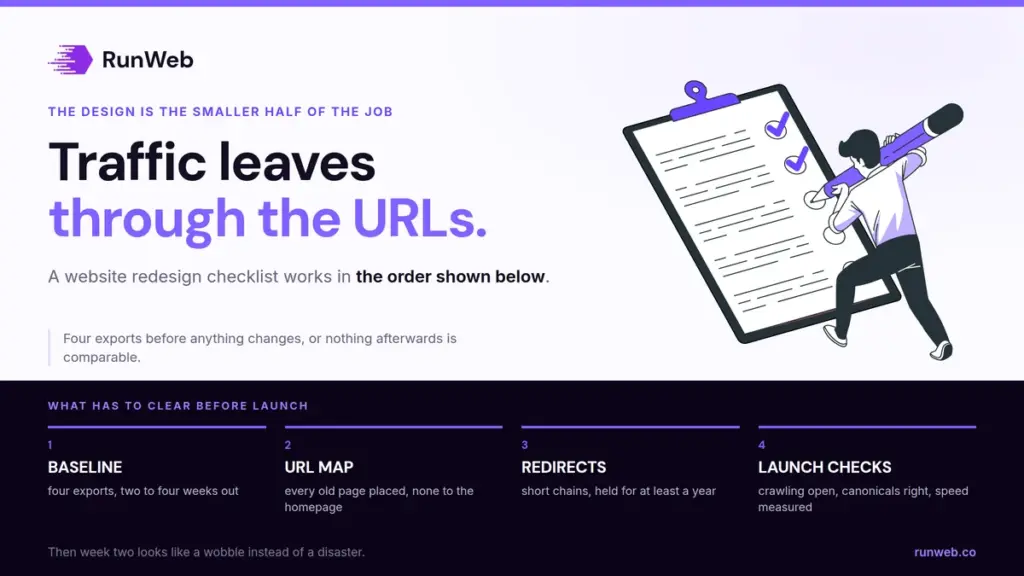
- A website redesign checklist earns its keep before launch, because the traffic that goes missing leaves at the URL level and not the design level
- Record your baseline two to four weeks out, or nothing afterwards can be compared to anything
- Map every old address to a specific new one, since sending them all to the homepage can be read as a soft 404
- Keep the redirects for at least a year, which is roughly how long the signal transfer takes
- Expect movement in the rankings for a few weeks after launch, and read the crawl reports instead of the mood in the room
Traffic lost in a redesign almost always leaves through the URLs.
The new site looks better and brings in less work, and the cause is usually a list nobody made. Old addresses stop resolving, so the pages that earned the rankings quietly stop existing.
A redesign is a migration, whatever the brief calls it. Planning it as one is what keeps enquiries arriving in the week after launch.
So here is the checklist, in the order the work actually happens.
Why a redesign counts as a migration
Agencies sell a redesign as a visual project, and the invoice reflects that. The risk sits somewhere else entirely.
Ahrefs defines the category plainly in its work on website migrations: a migration is any significant change to a site’s domain, URLs, hosting, platform or design. Your redesign qualifies on at least two of those counts, and most qualify on three.
If the addresses change, or the platform underneath them changes, the design work is the smaller half of the job.
One change at a time
Google’s guidance on moving a site asks you to plan changes one after the other instead of all at once, naming a domain move, a CMS switch and a new layout as three separate events.
Which is the opposite of how a redesign is usually scoped, since bundling them into one launch is exactly what the quote encourages. When something breaks in a bundled launch, you cannot tell which change broke it.
What to record before anything changes
A launch is judged against a number somebody wrote down. Without one, every argument afterwards is a matter of opinion, and the loudest person in the meeting wins it.
Semrush’s migration checklist puts baseline analytics two to four weeks before the move, so you understand the site’s current state well enough to know what the migration actually changed.
- Export every URL that gets traffic: Pull them from analytics and Search Console, not from the sitemap alone, because the sitemap reflects intent and the logs reflect reality.
- Save the pages that carry links: These are the ones where a broken redirect costs you something that took years to earn.
- Write down the enquiry count: Forms and calls for the last full month, which is the only figure that settles the argument later.
- Screenshot the speed scores: Field data for the current site, so a slower launch is provable instead of arguable.
Four exports, one afternoon. Skipping them is how a business ends up six months later unable to say whether the redesign helped, and verifying the result depends entirely on this step having happened.
Mapping old addresses to new ones
With the exports in hand, the mapping becomes clerical work. It is also the single place where most redesigns lose their traffic, so it deserves the afternoon it takes.
| The old page | Where it should go | Why |
|---|---|---|
| Kept, at a new address | Permanent redirect to its replacement | Permanent redirects do not cost you link credit |
| Merged into another page | Permanent redirect to the page that absorbed it | Consolidated content is a valid destination |
| Deleted with no replacement | A 404 or 410 response | Honest removal beats a misleading redirect |
| Anything you cannot place | Not the homepage | Bulk redirects to one irrelevant page can be treated as soft 404s |
Row four is the one that catches people. Google’s site-move guidance says directly that redirecting many old URLs to a single irrelevant destination, such as the new homepage, can confuse users and might be treated as a soft 404.
Keep the chains short while you are at it, since Googlebot follows up to ten hops but the guidance asks for no more than three. Three is the stated ceiling. Old redirects stacked on new ones is how a two-hop chain becomes a five-hop chain without anyone deciding to build one.
Where redirects quietly disappear
A mapping that was correct on launch day can be wrong a month later, and nothing on the site announces it. Four situations account for most of the losses.
- The host changed: Ahrefs flags this one specifically, since older rules living in server config files often fail to travel with the site and take their link equity with them.
- The plugin was replaced: Redirects held inside a plugin rather than at the server disappear the moment somebody swaps the plugin during a tidy-up.
- A staging block survived launch: The rules that kept the build private are trivial to leave in place, and they are equally trivial to test for.
- The new pages point at old addresses: Internal links copied across from the old build send every visitor through a redirect that did not need to exist.
Each of those is cheap to check and expensive to miss. A quarterly crawl catches all four, which is one of the things a care plan is actually buying you.
The launch-day checks that are not opinions
Launch day produces a lot of subjective feedback about spacing and colour. These checks are the ones with a right answer, so run them before anybody starts giving notes.
- Confirm the staging rules that blocked crawling are gone, and that a missing robots file returns a proper 404.
- Check that every new page carries a self-referencing canonical tag pointing at its own new address.
- Test a sample of redirects by hand, then crawl the full old list and look for anything landing on a missing page.
- Submit the new sitemap, and keep the old one available long enough to watch its indexed count fall.
- Verify analytics and the enquiry form both still fire, because a silent tracking failure can run for months.
The speed numbers to hold it to
Google’s Core Web Vitals set the targets at 2.5 seconds for largest contentful paint, 200 milliseconds for interaction to next paint and 0.1 for cumulative layout shift, assessed at the 75th percentile of page loads and split between mobile and desktop. All three come from real page loads.
That percentile matters more than the thresholds do. A launch that feels fast on the developer’s laptop can miss all three on the phones your customers actually hold, and a heavier page count makes that gap wider.
The first ninety days
Nothing on this list is finished at launch. The period afterwards is where a move either completes or quietly stalls, and five habits cover it.
- Leave the redirects alone: Google asks for at least a year, which is the time it needs to recrawl and reassign the links pointing at your old addresses.
- Expect the wobble: Rankings fluctuate while the site is recrawled, and a small or medium site takes a few weeks for most pages to move across.
- Watch the server, not just the charts: Google crawls a migrated site more heavily than usual for a while, so capacity is a launch concern and not an afterthought.
- Read the index reports weekly: Indexed counts falling on the old set and rising on the new set is the shape of a move going correctly.
- Compare against your baseline: The four exports from earlier, held against the same four numbers, which is the only honest scorecard available.
Patience is the hard part, because a dip in week two is normal and looks exactly like a disaster. How long the recovery should reasonably take is covered in the redesign timeline, and how long SEO takes sets the wider clock. If the rebuild has not started yet, when to rebuild is the prior question, and WordPress running costs covers what the new site costs to keep.
When you would rather the mapping, the redirects and the post-launch monitoring were somebody’s job instead of a checklist you work through at midnight, that is how our website work is set up.
Frequently Asked Questions
Do I need to submit a change of address in Search Console?
Only when the domain or subdomain itself changes. Google says the tool is not needed for a move from HTTP to HTTPS, for switching between www and non-www, or for changing paths inside the same domain.
We kept every URL identical. Is any of this still necessary?
Most of it, yes, because the platform and the templates still changed underneath. Skip the mapping and keep the baseline, the launch-day checks and the monitoring.
How do I know the redirects are working?
Crawl the exported list of old addresses and look at what each one returns, instead of clicking a handful by hand. A redirect that lands on a missing page still counts as a redirect to most tools.
Should we launch everything at once or in sections?
Small and medium sites are advised to move all URLs at the same time, which helps the change get detected and reindexed faster. Sectioned launches suit large sites where problems need isolating.
My traffic dropped in week two. How long before I should worry?
Give it the few weeks a small or medium site normally takes, while checking that indexed counts are moving in the right direction. A drop with no recovery in the index reports is a different problem from a drop that is simply early.