🎯 Key Takeaway
- Website maintenance cost is quoted as one number for two very different things: keeping the site alive, and making it better
- Basic care plans start near $50 a month, and named WordPress services run from about $59 to $500 depending on how complex the site is
- Across a whole year, upkeep lands anywhere between $400 and $60,000, which is why the average is useless to you
- Scope is what moves the price, so a plan that will not say what counts as an edit is the expensive one
- Judge a plan on its restore test, its response time and its ownership terms, because those are the three that cost you when they are missing
Two agencies can quote the same monthly figure and be selling you completely different work.
One is watching uptime, patching software and testing that a backup actually restores. The other is doing none of that and calling a monthly report maintenance.
Neither price tells you which one you have. That’s the whole problem with how this gets sold, because the invoice says maintenance, lists three tool names, and creeps up every year while nobody can say what changed.
So the questions below are what separate a real plan from a bundle, starting with what the work consists of.
What maintenance actually covers
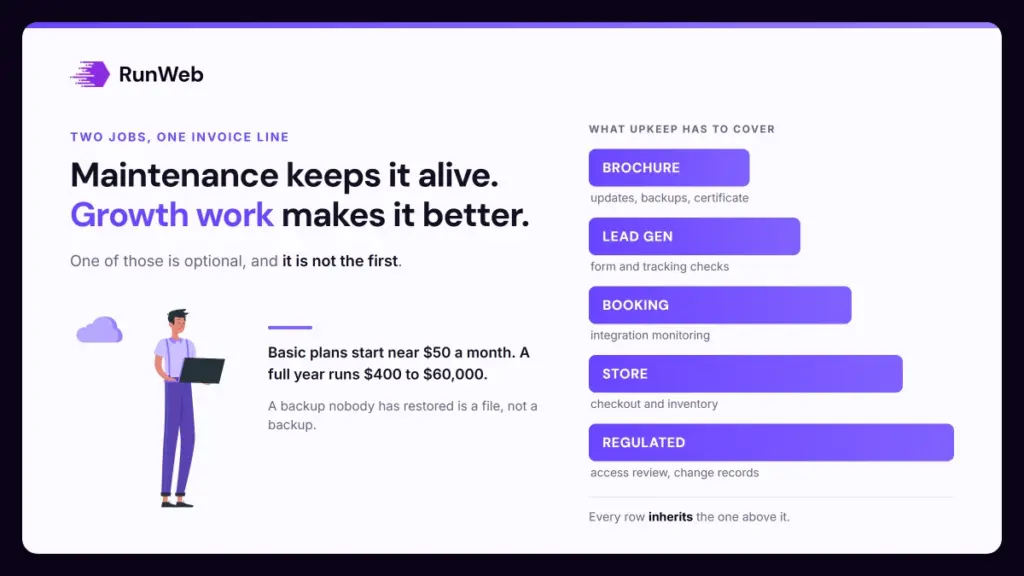
Website maintenance cost pays for two jobs that get billed as one. The first keeps the site running and safe, and the second improves it.
Only one of those is optional. Keeping it running means software updates, offsite backups, uptime monitoring, security scanning and someone checking that the contact form still delivers, and none of it shows up as a visible change.
Which is exactly why it’s the half owners cut first. Improving the site means new pages, offers, speed work and conversion changes, and that work belongs on its own line so you can scale it without touching the part that stops things breaking.
Why the two get bundled
Bundling them makes the quote look generous and the scope look vague, and both of those help the seller. A single figure covering “updates and marketing” cannot be compared against anything.
A plan you can’t itemise is a plan you can’t cancel part of. That is usually the point.
Separating them also tells you something about your own risk. If the site takes bookings, the stability half matters more than the growth half, and the plan should say so.
What the market charges, and why the spread is so wide
Published figures put basic care plans at around $50 a month for backups, updates and some monitoring, with named WordPress services running from roughly $59 to $500 a month as the site gets more complex.
Across a full year the range is far wider. HubSpot puts annual upkeep at $400 to $60,000, which sounds unhelpful until you notice what sits at each end.
At the bottom is a brochure site with a domain, a certificate and hosting. At the top is a store with integrations, compliance duties and someone on call. Both get called maintenance.
Both ends are real quotes to real businesses. What sits between them is scope.
| What the site does | What upkeep usually includes | What pushes it higher |
|---|---|---|
| Brochure, rarely changes | Updates, backups, certificate, hosting | Nothing much, until the platform forces a rebuild |
| Lead generation with forms | The above, plus form and tracking checks | Call tracking, CRM connections, faster response times |
| Booking or scheduling | The above, plus integration monitoring | Third-party tools that update on their own schedule |
| Online store | The above, plus checkout and inventory checks | Payment providers, tax rules, higher traffic |
| Regulated or high-trust work | The above, plus access review and change records | Documentation, approvals, restricted admin access |
Each row inherits the one above it. That’s the honest shape of the pricing, and it’s why asking what tier you are is less useful than asking what your site has to do without failing.
The tasks a plan should name, and how often
A plan worth its fee names its tasks and its cadence, because a task without a frequency is an intention. Published maintenance checklists put uptime monitoring at every few minutes, software updates weekly, backups daily or weekly, and security scans daily.
Those cadences are the part you can hold a supplier to. Ask which of them are automated and which need a person, since the automated ones cost almost nothing and the manual ones are what you’re really paying for.
That single question reprices most quotes.
- Uptime monitoring: Continuous, with alerts routed to you as well as the vendor, because an alert only the agency sees is not a service you can verify.
- Software and plugin updates: Weekly on an active site, applied to a staging copy first where anything is customised.
- Offsite backups: Daily for a site that changes or takes orders, weekly for one that doesn’t, and stored somewhere other than the server itself.
- Restore testing: On a schedule, not on the day you need it. A backup nobody has restored is a file, and that distinction gets expensive exactly once.
- Security scanning: Daily, with malware checks and login protection, and a stated process for what happens when something is found.
- Form and checkout testing: Weekly, end to end, including the confirmation email. Lead forms fail quietly and nobody reports a form that never arrived.
- Performance checks: Weekly or automated, measured against real thresholds instead of a score out of a hundred.
- Broken link and content review: Monthly for links, yearly for content and plugins, which is when you find the three tools nobody has opened since launch.
Performance deserves a real target. Google publishes Core Web Vitals thresholds of 2.5 seconds for Largest Contentful Paint, 200 milliseconds for Interaction to Next Paint and 0.1 for Cumulative Layout Shift, and those three are what a weekly performance check should be reporting against.
Where the money leaks
Expensive plans are rarely expensive because the work is hard. They’re expensive because the same thing is sold twice and the scope is written so loosely that nothing can be removed.
Duplicate tooling is the most common version. Your host already includes backups and a firewall, the agency adds its own, and you pay twice while nobody can say which one is authoritative.
All of the leaks below work the same way.
- SEO included, undefined: If the deliverable is a monthly report with no work attached to it, you’re paying a retainer for a PDF.
- Unlimited edits, no turnaround: Unlimited without a response time means the queue is the limit, and the queue is not in the contract.
- Licences you cannot take with you: Ask whose account each plugin licence sits in, because tools billed monthly and registered to the agency leave with the agency.
- Backups with no restore test: The cheapest line to promise and the most expensive to have wrong.
- Alerts routed only to the vendor: You find out the site was down from a customer, which is the one route that costs you money.
- Overlapping security add-ons: Ask what each one detects that the others don’t, and expect at least one to have no answer.
None of those need technical knowledge to spot. Each one is a question about the contract, and a supplier who answers all six quickly is usually the one doing the work.
Working out your own number
Your own figure is a small sum, and it’s worth writing down before you compare quotes. Add the recurring lines, multiply by twelve, then add any build or rebuild cost sitting in the same year.
Take a lead-generation site with a care plan at $150 a month, hosting and security at $30, and no growth work. Monthly recurring is $180, so a year of upkeep is $2,160 with nothing else attached.
Then add a $350 monthly retainer for content. The recurring line becomes $530, or $6,360 across the year, and both figures come from that same formula.
What it has to be worth
Turning either number into a decision needs margin, and this is where most website sums go wrong. A job worth $2,000 in revenue at a 30% gross margin contributes $600, so $6,360 of annual spend needs about eleven of those jobs before it breaks even.
Eleven jobs is a target you can check. Compare it against what the site actually produced last year, and if you can’t answer that, the first thing to buy is tracking.
Revenue makes any marketing spend look brilliant. Margin is the number that decides whether it was.
And build cost belongs in the same year’s total when there is one, which is why the small business website cost guide and this one are two halves of a single budget.
What to settle before you sign
All of that turns into eight questions, and they’re worth asking in the same order every time so quotes stay comparable.
- What counts as an edit? The answer separates a plan with support from a plan with a support ticket queue.
- What’s the response time for an outage, in writing? Same-day costs more than five working days, and that gap is most of the price difference between tiers.
- When was a restore last tested? A supplier who can name the date is running the process.
- Whose accounts hold the domain, hosting and licences? Ownership decides how expensive leaving is.
- What’s excluded? Exclusions become invoices, so get them listed while you’re still choosing.
- Who receives the monitoring alerts? Both of you, or the service is unverifiable.
- What happens on cancellation? Ask about the handover, not the notice period.
- Which tasks are automated? It tells you what the human hours are actually spent on.
Those eight also work as a review of the plan you’re already paying for. Most owners find at least one duplicate line and one promise with no cadence attached to it.
Then there’s timing. A point arrives where upkeep stops being the right spend and a rebuild costs less than another year of patching, and the redesign timeline shows where that line sits.
Where the platform is what makes upkeep expensive, WordPress running costs separates the charges that come from the platform from the ones that come from plugins. And if the site is growing instead, what changes between packages covers the build side of the same decision.
When you’d rather have one plan with the scope written down, our maintenance and hosting plans are quoted against your site and cancel any time.
Frequently Asked Questions
Can I just do the updates myself?
Updates themselves are a few clicks, so the honest answer is yes for a simple brochure site. What you’re buying with a plan is the staging copy, the tested backup and someone available when an update breaks a page on a Friday.
Is hosting the same thing as maintenance?
Hosting is the server, and maintenance is the work done to what sits on it. Managed hosts blur the line by including backups and updates, so check for overlap before you buy both.
Why does my invoice go up every year?
Plugin and theme licences renew annually and rarely renew at the same price, and traffic growth moves you up a hosting tier. Ask for the renewal lines itemised, since that’s usually where the increase lives.
What happens if I stop paying for maintenance?
Nothing visible, for a while. The risk builds quietly through unpatched software and untested backups, and it usually surfaces as a compromised site or a plugin conflict that takes the contact form down.
Should the same company build and maintain the site?
One supplier is simpler and removes the argument about whose fault a fault is. Split it if you want, provided the accounts are in your name and the handover process is written down before you need it.