🎯 Key Takeaway
- WordPress website cost splits three ways: the software, which is free, the hosting and plugins, which are not, and the build, which is a person’s time
- Hosting runs from a few dollars a month on shared plans up to several hundred for dedicated, and that choice sets your speed ceiling
- Premium plugins and themes renew annually, which is where an invoice quietly grows year on year
- Published annual upkeep across all platforms runs $400 to $60,000, so the platform is rarely the expensive part
- Judge a WordPress quote on plugin count and update process, because both decide what the site costs to own after launch
WordPress itself is free, and almost nothing else about a WordPress site is.
That gap is where the confusion lives. Owners hear free software and then get a quote with hosting, licences, a theme and a build fee attached to it.
None of those charges are hidden, exactly. They just arrive from four different places, and no single invoice shows you all of them.
So here is what each part actually costs, and which of them the platform is responsible for.
Where the money actually goes
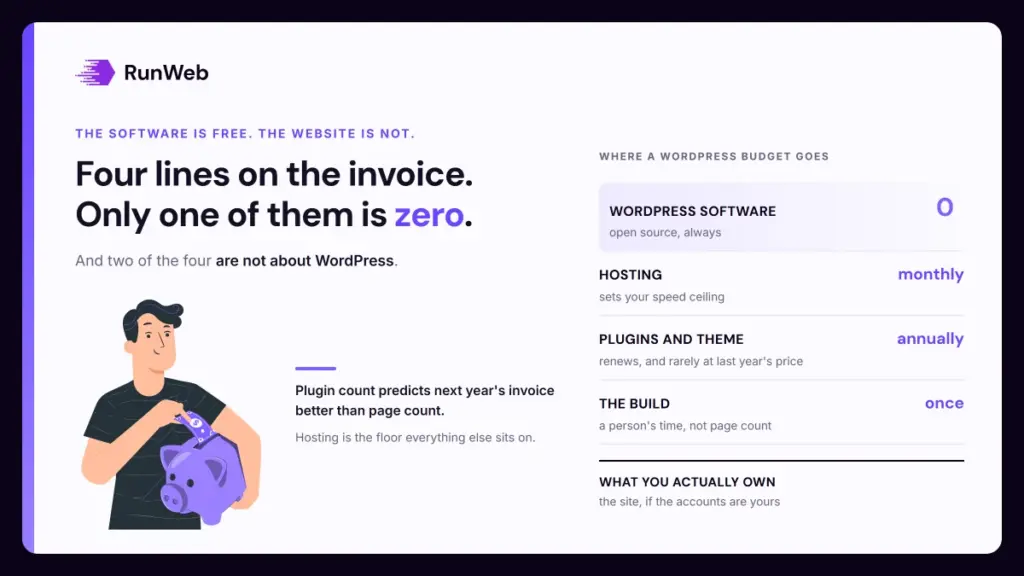
WordPress website cost breaks into four lines, and only one of them is zero. The software is free, and hosting, extensions and build time are not.
That distinction sets budgets wrongly more often than any other. You’re downloading an engine, and you still need somewhere to run it and someone to assemble the car around it.
Each line also behaves differently over time. Hosting is steady, licences renew annually, and build cost lands once.
| Line | When it is charged | What moves it |
|---|---|---|
| WordPress software | Never | Nothing, it is open source |
| Domain | Annually | Extension chosen, privacy options, registrar |
| Hosting | Monthly or annually | Traffic, performance tier, support level, backups |
| Theme and plugins | Once or annually | How many you need, and how many are premium |
| Build | Once | Pages, copy, integrations, how much is decided for you |
| Upkeep | Monthly | Update frequency, monitoring, response time |
Only two of those six are specific to WordPress. The rest apply whatever you build on, which is worth remembering when a platform gets blamed for a budget.
Hosting sets the ceiling
Hosting is the line people economise on first and regret most. Published figures put shared hosting at a few dollars a month and dedicated servers in the hundreds, with managed WordPress plans sitting between them.
Headroom is what the higher end buys. Shared hosting puts your site on a machine with many others, so a busy neighbour becomes your slow afternoon.
That matters because speed has published thresholds now. Google’s Core Web Vitals are Largest Contentful Paint at 2.5 seconds, Interaction to Next Paint at 200 milliseconds and Cumulative Layout Shift at 0.1, and cheap hosting makes the first of those hard to hit.
You can optimise images all week and still miss a loading target because the server took a second to answer. Hosting is the floor everything else sits on.
So price hosting against your traffic and your patience instead of against the cheapest plan on the comparison page, because the money saved in year one tends to reappear as a migration in year two once the site outgrows the machine it was put on. Moving later is possible. Nobody enjoys it.
Plugins are the line that grows
Plugins are what make WordPress flexible, and they’re also why year three costs more than year one. Most are free, the useful ones often are not, and premium licences renew annually at whatever the vendor decides.
Each one is also code somebody else maintains. When a plugin is abandoned you inherit a security problem and a migration, and neither was in the original quote.
So the count is a forecast. Ten well-chosen extensions are cheaper to own than thirty that overlap.
- Forms: Usually the first premium licence, and worth it where the free version cannot route or store what you need.
- Security and backups: Check what the host already includes before buying, since this is the most commonly duplicated line.
- SEO: A free plugin covers most small sites, and the paid tiers mostly add reporting.
- Page builders: Convenient to work in, heavy to load, and the hardest thing to leave behind later.
- Booking or payments: Priced per transaction as well as per licence, so model both.
- Caching: Often free, sometimes included with managed hosting, and rarely worth paying for twice.
Ask which licences are registered in your name. Tools billed to the agency leave when the agency does, and because that discovery almost always arrives during a handover rather than before one, the replacement has to be found and configured in the same week the site changes hands.
What the build itself costs
Build cost is a person’s time, so it scales with decisions rather than pages. A five-page site where you supply finished copy is a different job from a five-page site where somebody works out what the pages should say.
Public ranges stretch from a few hundred dollars for a self-built template to five figures for agency work. Both are honest, and the gap between them is discovery, copy, tracking and testing.
So the platform barely moves the number. A build with the same scope costs about the same on any modern system, which is why platform comparisons rarely settle a budget argument.
- Supply your own copy: The single biggest lever on a build quote, and the most common cause of a project running late when you underestimate it.
- Decide the service list first: One page per service you want enquiries about. Adding a fourth after the navigation is built costs more than it should.
- Price integrations separately: A CRM, a booking tool or payments adds work unrelated to page count, and this is where quotes diverge most.
- Say what a lead is: Tracking scoped to booked jobs rather than clicks costs a little more now and settles every later argument.
Those four are where the hours go. The full picture across every platform sits in small business website cost, and what changes as the quote rises is covered in what packages include.
The running total after launch
Owning the site is the number that surprises people, and it’s easy to work out. Add hosting, domain, licence renewals and any maintenance plan, then multiply by twelve.
Take a modest site on managed hosting at $30 a month, with $150 a year of plugin renewals and a $120 monthly care plan. That’s $360 of hosting, $150 of licences and $1,440 of upkeep, so $1,950 across the year.
Now strip the care plan. The same site costs $510 a year to run, and the difference is who spends the Tuesday morning applying updates.
How that compares across platforms
Annual upkeep across all platforms runs from $400 to $60,000, and basic care plans start near $50 a month. WordPress sits inside that range rather than above it.
What WordPress does add is the update burden, since an open ecosystem means more moving parts. That’s the honest trade for the flexibility, and what maintenance covers breaks down where those hours go.
What to ask before you commit
All of that reduces to seven questions, and they work equally well on a quote you have already accepted.
- How many plugins will the site run? The count predicts your future maintenance bill better than any other single number.
- Which licences renew, and in whose name? Renewals are the reason an invoice grows, and ownership decides how easily you can leave.
- What hosting tier, and what happens when traffic grows? Ask for the upgrade path, not just today’s price.
- Is a page builder being used? It affects load time and it is the hardest decision to reverse later.
- How are updates applied? On a staging copy first, or straight to the live site on a Friday.
- Which performance targets are tested? Named thresholds on named pages, tested after launch as well as before.
- Can I edit the pages myself? Ask for a demonstration on the actual site rather than a yes.
Those seven separate a cheap build from a cheap-to-own one, and since the second is what you live with for the next three or four years while the first is a single invoice you forget about by spring, it is the one worth arguing over. The second is what you’re buying.
Where a rebuild is what you’re really scoping, the redesign timeline covers what that adds to the year.
If you would rather have the plugin list, the hosting tier and the update process written into the quote, our WordPress builds are scoped that way.
Frequently Asked Questions
Is WordPress actually free?
The software is, and it always has been. Everything around it costs money, so a realistic budget starts at hosting and a domain even if you build the site entirely yourself.
Do I need premium plugins?
Most small sites run fine on free versions, with forms usually the first thing worth paying for. Buy a licence when the free version cannot do a specific thing you need, not in case it might.
Why did my hosting price jump at renewal?
Introductory rates are common and they expire, often at two or three times the first-year price. Check the renewal figure before you commit, since it is the number you will pay for most of the site’s life.
Is managed WordPress hosting worth the extra?
It buys speed, automatic updates and support that understands the platform, which suits a site you do not want to think about. A confident owner on a low-traffic site can run well on cheaper hosting.
What happens if a plugin gets abandoned?
It keeps working until an update breaks it or a vulnerability appears, at which point you need a replacement quickly. Reviewing plugins once a year is what turns that from an emergency into a task.