🎯 Key Takeaway
- Asking how often should a website be redesigned assumes an interval, and no useful interval exists, because rebuilds are forced by constraints rather than by age
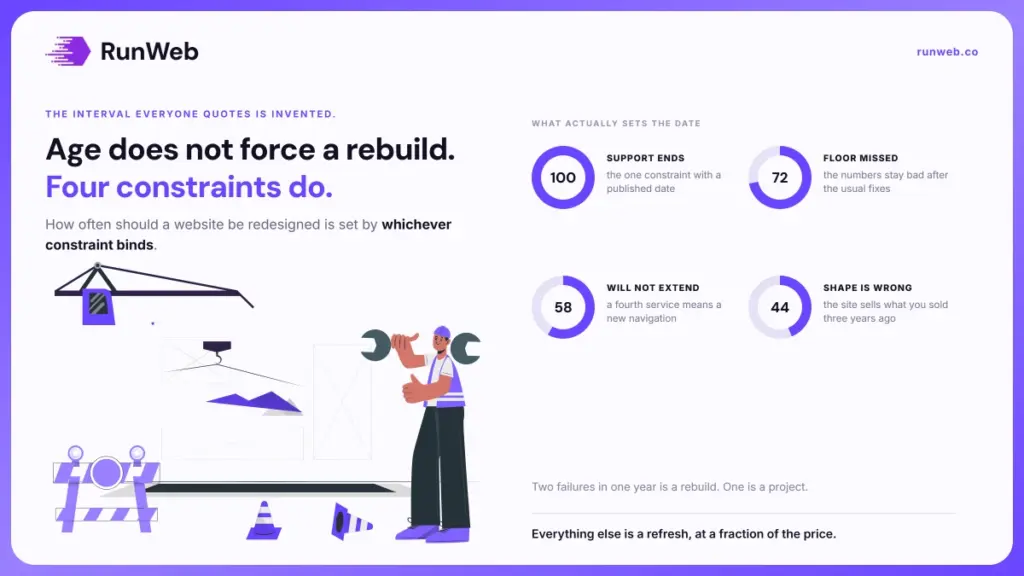
- Only four things really force the date, which are platform support ending, a performance floor you cannot reach, a structure that will not extend, and a business that no longer matches the site
- Everything else is a content refresh or a maintenance job, and both cost a fraction of a rebuild
- A redesign is the riskiest change you can make to a site that already ranks, so a working site raises the bar for doing one
- Most service businesses land on five to seven years, though the number is an outcome of the four constraints and never the reason
Almost no website needs redesigning on a schedule.
But the question nearly always arrives as though a correct interval exists, somewhere around three to five years. Age is not the unit. It tells you very little about whether a site still works for the business behind it.
What forces a rebuild is a constraint that binds, and constraints arrive on their own timetable rather than on the calendar’s.
So here are the four that actually set the date, along with the much cheaper answers to everything else.
Why the calendar is the wrong trigger
That rule circulates because it’s easy to say, and because the people repeating it mostly sell redesigns. It survives on plausibility rather than on evidence.
Then consider what it implies. A site built carefully four years ago, still loading fast and still taking enquiries, would be due for replacement, while a badly built one from last year would not.
Age is a proxy for the things that actually matter, and it is a poor one, because the things that matter are all measurable directly.
What to measure instead of counting years
Every real trigger shows up as a number or a hard stop. So the useful exercise is checking those numbers once a year and letting the answer decide, rather than booking a rebuild because the site had a birthday.
That check takes an afternoon. And it usually ends with a decision to fix two things rather than to replace everything, which is the outcome nobody selling a redesign will suggest to you.
The four constraints that force a rebuild
That leaves four constraints which do justify starting over, and each one carries an observable trigger. If none of them applies, a rebuild is a preference rather than a need.
- The platform or theme stops being supported: Once security updates end for the thing your site is built on, the clock is no longer yours to set. That is the one constraint with a published date attached.
- You cannot reach the performance floor: When the numbers stay bad after the usual fixes, the build itself is the cause, and no amount of tuning gets past it.
- The structure will not extend: Adding a fourth service or a second town means rebuilding the navigation, which is a scoping failure that compounds with every addition.
- The business has changed underneath it: When the site sells what you sold three years ago, the mismatch costs you enquiries daily, and editing pages will not fix a wrong shape.
Notice that only the first arrives on a date somebody else controls. The other three are gradual, which is exactly why they get tolerated for years past the point where fixing them would have paid.
Whichever one applies, the sequence and the realistic duration are covered in the redesign timeline, and it is worth reading before committing to a launch date.
Matching the fix to the constraint
Because most complaints about a website need no rebuild at all, matching the complaint to the right size of fix is where the money gets saved. Three responses cover nearly everything.
Performance is the one with published thresholds, so it can be settled with numbers rather than opinions. Google’s Core Web Vitals set 2.5 seconds for Largest Contentful Paint, 200 milliseconds for Interaction to Next Paint and 0.1 for Cumulative Layout Shift, assessed at the 75th percentile of page loads.
| What is wrong | The right response | Roughly what it involves |
|---|---|---|
| Pages read badly or describe old services | Content refresh | Rewriting pages on the existing build |
| It looks dated but converts fine | Visual refresh | Type, colour and imagery, structure untouched |
| Slow, but only on some pages | Maintenance work | Images, caching, plugins, hosting |
| Cannot add services or areas | Rebuild | New structure, content migrated |
| Platform support has ended | Rebuild | New platform, redirects mapped |
The middle column is a budget ladder. The first three land in the range HubSpot reports for annual website upkeep, which runs from $400 to $60,000 depending on what the site does, and the bottom two do not.
What ages fastest on a service site
Even a carefully built site does not age evenly, which is the part that table cannot show. Four things go stale quickly while the underlying build stays perfectly serviceable.
- The services you list: Almost always the first thing to fall out of date, and almost always editable in an afternoon.
- Proof and photographs: Reviews, project images and staff photos date visibly, and they carry more weight with a nervous buyer than the layout does.
- The enquiry path: Forms break silently after plugin and platform updates, so the leak runs for months before anyone notices.
- Mobile behaviour: New phone sizes and browser changes expose layouts that were fine when built, and this is the one that most often looks like a design problem.
- Anything with a date on it: Copyright lines, price references and seasonal notices quietly signal that nobody is home.
None of those five is a reason to rebuild, and all five are reasons a site feels old. Which is why the honest first step is fixing them and then re-asking the question, since a refreshed site often turns out to need nothing else.
What that upkeep costs, and what it buys, is set out in maintenance cost, and the platform half of it in what WordPress costs.
The risk of rebuilding a site that works
That distinction matters most when the site already works. A rebuild isn’t a neutral act, and replacing a site that earns traffic puts the traffic at risk by more than most quotes acknowledge.
Ahrefs’ work on redesign SEO risks documents a site that deleted about 15% of its organic pages and then lost almost 50% of its organic traffic, noting that even the growth of referring domains afterward did not help it recover. So the downside is not theoretical.
- Broken redirects: Old addresses that lead nowhere throw away every link and every bookmark pointing at them.
- Pages quietly dropped: Thin-looking pages get cut during a rebuild, and some of them were the ones ranking.
- Internal links lost: A new navigation changes which pages get pointed at, which changes how they perform.
- Duplicate content: Two live versions of the same page split the signals between them.
- Orphan pages: Pages that survive the move but end up linked from nowhere behave as though deleted.
Each of those is preventable with a redirect map built during the build rather than at launch. Build it early. But preventable is not the same as prevented, and the failure mode stays silent for weeks.
Dating your own next rebuild
So the practical answer to that whole question is a yearly check with five entries. Run it each January and the date sets itself.
- Look up the support end date: For your platform and your theme, then write both in the calendar. Everything else is judgement, and these two are facts.
- Check the three performance numbers: Against the published thresholds, on mobile, on your two most important pages.
- Try to add a service: Actually attempt it. If it needs a developer or a new navigation, the structure has already failed.
- Read your own home page aloud: If it describes a business you no longer run, that is the mismatch constraint, and it is costing you now.
- Count enquiries per hundred visits: A falling number with steady traffic points at the site, and a falling number with falling traffic points at search.
Two or more failures in one year is a rebuild. One failure is a project. None at all is a maintenance plan, which is the answer most years will produce.
Where a rebuild is the answer, scope decides the price, and website packages covers which decisions you are buying, while page count settles the argument that otherwise runs through the whole project. If falling traffic turned out to be the trigger, checking whether SEO works comes first, because a rebuild will not fix a search problem.
When the yearly check says maintenance rather than rebuild, that is the cheaper path and our website maintenance work is built around it.
Frequently Asked Questions
Will search traffic drop right after launch?
Once the new pages are recrawled, a short dip is normal even on a clean migration. What is not normal is a decline that persists past a few weeks, which usually points at redirects or at pages removed during the move.
Can I keep my content and only change the appearance?
Keeping copy and URLs while changing type, colour and imagery is the cheapest useful option available. It also avoids nearly all of the migration risk, since nothing an external link points at has moved.
Is a platform change worth doing at the same time?
Doing both together is more efficient than doing them separately, though it raises the stakes on the redirect map. Insist on a staging copy and a full address mapping before anything goes live.
How do I stop the project growing halfway through?
Write down the constraint that triggered it and treat that as the scope. Anything not serving that constraint goes on a list for later, or the project expands until the budget decides for you.
Does a newer site rank better by itself?
Freshness applies to content rather than to build dates, so a new site with the same pages earns nothing automatically. Gains come from what the rebuild lets you fix, like speed, structure and clearer pages.