🎯 Key Takeaway
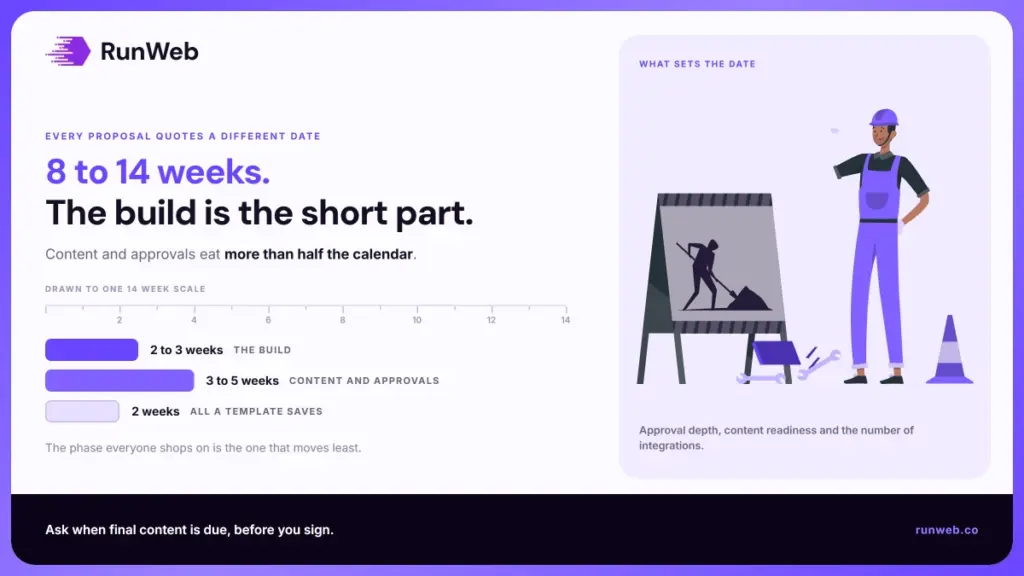
- A realistic website redesign timeline runs 8 to 14 weeks for a service business site of 8 to 25 pages
- Approval depth, content readiness and integration count move the date far more than design and development do
- Content is the single biggest delay, adding three to five weeks when it starts late
- Template and custom builds differ mainly in the build phase, not the whole schedule
- The redirect map belongs in the build phase, not launch week
Most redesigns for a small service business run eight to fourteen weeks. What makes that range so wide has very little to do with which agency you hire, and almost everything to do with how quickly your own team answers questions.
That’s why three quotes for the same job can come back at six weeks, twelve weeks, and no date at all. None of them is lying to you. They’re each making a different assumption about how fast you’ll move, and only one of them is going to be right.
We watched a nine-week build turn into five months once. The design had been signed off in week four, and everything after that was people waiting to hear who owned the About page.
So here’s the schedule underneath those quotes, phase by phase, including where the weeks actually go and how to write a version somebody can be held to.
What actually sets your website redesign timeline
Three things set the date, and only one of them is technical. How many people approve the work. Whether your content already exists. How many outside systems have to keep working the morning after launch.
Everything else is noise around those three.
That is not how most proposals read. They price design and development in detail, because those are the phases an agency controls, then leave the rest resting on an assumption about how fast you will be.
The two phases every quote itemises are the two phases that rarely move. The ones nobody prices are where your fourteen weeks went.
The three variables that move the date
- Approval depth: One decision maker moves in days, whereas a committee of four with a marketing lead who travels moves in weeks, because every extra approver adds waiting time on top of opinion.
- Content readiness: Copy, photography, service descriptions, team bios and case studies all have to exist before a page can be built, so if none of it exists on day one, someone has to write it, and that someone usually has a day job.
- Integration count: A brochure site with a contact form stays simple, but once you add a booking tool such as Calendly, a handoff into a CRM and online payments, you have created a testing phase that was not in the original quote.
Those three variables are why two projects of identical size finish months apart. A plumbing company with one owner and eight pages can land in seven weeks. A financial advisory firm running compliance review over every claim will not, and should not try to.
Page count is the multiplier under both, so settle how many pages you need before anyone draws a schedule.
Why template versus custom matters less than you think
Owners assume that picking a template collapses the whole timeline. Then the finish date barely moves, and it feels like a bait and switch.
But a template only shortens the build. Discovery, content, approvals, QA and migration all take exactly what they were going to take, and those are the phases where the weeks live. Choosing a pre-built WordPress theme over a custom Figma-to-code build buys you nearer two weeks out of eleven than the half a project people expect.
Worth knowing before you pick on speed alone.
How long does a website redesign take, phase by phase
Once those three variables are known, the range stops being mysterious. A small service business site of 8 to 25 pages takes 8 to 14 weeks, kickoff to reindexed. The build is the shortest meaningful phase in that. Discovery and content between them eat more than half the calendar.
The realistic range, and what gates each phase
| Phase | Typical duration | What gates it | What blows it out |
|---|---|---|---|
| Discovery and audit | 1 to 2 weeks | Access to analytics, Search Console, hosting | No admin access, missing tracking history |
| Information architecture and content inventory | 1 to 2 weeks | Agreed page list and URL map | Late scope additions, unclear page count |
| Design and approval | 2 to 3 weeks | Named approver and a fixed round count | Open-ended revision cycles |
| Build | 2 to 3 weeks template, 3 to 5 custom | Approved designs, final content | Content arriving in fragments |
| Content migration and redirect map | 1 week | Complete old-URL export | Discovering 400 blog URLs nobody mentioned |
| QA and integration testing | 1 to 2 weeks | Staging environment, test accounts | Payment or CRM handoffs failing quietly |
| Launch and DNS cutover | 1 to 2 days | Redirects live, backups verified | Registrar access nobody has |
| Post-launch monitoring | 2 to 4 weeks | Search Console access | Skipping it entirely |
Two things that table hides. The first is overlap: content writing runs alongside design in a well-run project, and that is how fourteen weeks compresses into ten without anything being cut.
The second is uglier. The phases at the bottom are the ones dropped first when a deadline slips, and QA and post-launch monitoring are exactly what protect your leads. So the squeeze lands on the two phases you can least afford to lose.
Where redesign timelines slip
Those bottom phases only get squeezed because something earlier ran long. Nineteen times out of twenty the cause has nothing to do with code. Content and approvals account for most of it, and both are fixable before you sign anything.
Content is the number one delay
Ask any agency what kills schedules. You will get a one-word answer, and the word is copy.
The pattern is predictable enough to plan around. Design gets approved in week five, the build starts, and the developer asks for real text across eleven pages that nobody was assigned. Three weeks pass while the owner writes service descriptions at 11pm between jobs.
Treat content as a phase with an owner and a due date, not a background task. And if you are commissioning a writer, they start during discovery, not after the design is signed off.
Approval latency compounds
Approvals do the same damage, more quietly. A round of feedback that arrives on day four rather than day one costs three days, then costs you whatever build slot has since gone to somebody else. That second cost is usually the bigger one.
- Fix the round count: Two rounds on design and one on build, agreed before anyone opens Figma.
- Name one approver: A person who can say yes without calling a meeting, not a committee with a shared inbox.
- Book the slots now: Calendar invitations for each review, sent in week one, while the diary is still empty.
Scope creep arrives disguised as a small ask
“Can we add a careers page?” It stops being a small ask once you count the design, the content, the form, the notification routing and the QA pass behind it. Same with “can the booking widget also text the customer”, once somebody has to test that it does.
Keep a parked list from week one. Anything outside the original page count goes on it and ships as a phase two, which lets you say yes without moving the date.
The redirect window deserves its own slot on the calendar
One item never goes on that parked list. Changing your URLs is the riskiest thing a redesign does to your search traffic, and Google treats it as a site move, with guidance on site moves with URL changes that is explicit about recrawling and reprocessing taking time even when the setup is correct.
That window opens after your launch date, not before it. So the redirect map cannot be a launch-day task, and it belongs back in the build phase where there is still room to check the work.
Build the redirect map during build, not at launch
- Export every existing URL: Crawl the live site with a tool such as Screaming Frog and pull the full list, including the PDFs and the old blog posts nobody remembers publishing.
- Sort by value: Match each URL against its Search Console clicks and impressions, so that pages already earning traffic get individual destinations rather than a blanket redirect to the homepage.
- Map one to one where you can: Every old URL should point at the closest equivalent new page, because dumping the whole list at the homepage throws away link equity you spent years earning.
- Test on staging: Run the redirect list against the staging build before cutover, while there is still time to fix what it catches.
- Keep the map: Six months later, when a ranking drops and nobody can explain it, that file is the first thing you will want to open.
Those five steps protect the schedule as much as the rankings, and step two is the one people skip. A blanket redirect to the homepage takes an afternoon. Rebuilding the traffic it throws away takes a year.
What has to pass before you go live
Once the redirect map exists, one thing stands between you and a live site. A launch gate is a short list of statements that must be true before DNS changes. Without one, a site goes live because the date arrived rather than because it was ready, and that is how a replacement ends up slower and thinner than what it replaced.
Performance and structured data gates
Keep the list to checks you would actually delay a launch over. A gate nobody will enforce is just a document.
- Core Web Vitals on mobile: The thresholds are in Google’s Core Web Vitals documentation, and you only need the templates that carry traffic. Homepage, one service page, contact page. Not all forty URLs.
- Structured data validity: Marking up services, reviews or business details? Run it against Google’s structured data guidelines before launch, not weeks later off the back of a report.
- Every form tested end to end: Submit each one yourself and confirm the email lands in an inbox somebody reads, because a form that posts to a noreply address will look like it works for months.
- Tracking events firing: Confirm that your form and call events register before the site goes live, or the first month of data you report on will be fiction.
- Redirects live and spot-checked: Pull the twenty old URLs that earn the most traffic and click every one of them yourself.
The two weeks nobody warns you about
Even with every gate passed, rankings wobble after a redesign. Positions move, impressions dip, and it settles as Google reprocesses the new structure.
Two to four weeks of that is normal. What matters is whether you can tell turbulence from a real problem, and that depends entirely on a baseline recorded while the old site was still up. Screenshot your Search Console performance report the week before you go live. You cannot take that reading afterwards.
Recovery is the fastest clock search work runs on. Reclaimed rankings come back in weeks, which is why a redesign dip panics people who have never watched new content take six months.
The full set of those clocks, and which one your project is actually on, is in how long SEO takes.
How to turn this into your own website redesign timeline
All of that only helps if it ends up on paper. A useful schedule is one page carrying dates and names, and writing it takes about twenty minutes.
A one-page schedule you can hold people to
- Work backwards from a real constraint: A trade show, a season or a contract end date will hold, whereas a date somebody picked because it sounded reasonable gets moved the first time it is tested.
- Put a name against every phase: Not a company name, but a person who answers email, because a phase owned by an organisation is a phase owned by nobody.
- Mark the content deadline in red: Set it two weeks before the build starts rather than on the day the developer needs it, since that gap is what absorbs the inevitable rewrite.
- Book the approval slots now: Send actual calendar invitations for design review, weeks in advance, with the decision maker in the room instead of on the thread.
- Reserve the migration week: Leave one full week between build completion and launch that belongs to redirects and QA and to nothing else.
- Schedule the post-launch check: Put it in the calendar two weeks after launch, while everybody still remembers agreeing to it.
Budget shapes the same schedule from the other side, and small business website costs sets out which tier buys which page count.
Then print it. Put it somewhere people walk past, because a schedule living inside one person’s inbox stops being a schedule the week they go on holiday.
Bringing it back to those three tabs
That one page is also what lets you read the three proposals properly. The six-week quote and the twelve-week quote may well describe identical work, and what separates them is whether the agency priced your approval process realistically or quietly assumed you would be fast.
So ask all three of them the same questions.
- How many revision rounds are included? An open-ended answer means the schedule is open-ended too.
- When do you need final content? If the answer is “as we go”, the content phase has not been planned at all.
- What happens to my old URLs? Silence here is the expensive one, and it is the question fewest owners think to ask.
Those three answers describe your real timeline better than the number on the cover page.
Once the new site is live, the work shifts to visibility, and that runs on its own clocks. Local search for trades covers which parts report back in weeks, and Local Service Ads covers what to run while the rest matures.
If you would rather start from a date that holds than one that sounds good in a meeting, our website redesign service opens with the audit that sets it.
Frequently Asked Questions
How often should a website be redesigned?
Most service businesses get five to seven years from a well-built site, provided smaller refreshes happen along the way. Rebuild when the platform blocks something you need, rather than because the design feels dated, since incremental updates cost far less than a full replacement cycle.
Can a redesign launch in phases instead of all at once?
Phased launches work well where sections are truly independent, such as moving a blog ahead of the main site. They struggle on navigation and branding, because visitors end up crossing between old and new templates mid-journey, so agree the seams before splitting.
Does a redesign need a content freeze?
Freezing new content for the final two weeks prevents the awkward case where a post published on the old site never makes it across. Anything urgent during that window gets queued and published on the new site straight after cutover.
What should customers be told while the redesign is underway?
Nothing, in most cases, because a staging build means the live site keeps working normally until cutover day. Announce it afterwards, and only where the change affects how people book, pay or log in.
Is redesigning cheaper than rebuilding from scratch?
Reusing an existing platform saves money while the foundation is sound and the problem is presentation. Once you are fighting a page builder or a theme with performance problems baked into it, a rebuild frequently costs less than the workarounds do.