🎯 Key Takeaway
- Learning how to move a website to a new host starts with a DNS setting you change a week early
- Google advises lowering the TTL to a few hours at least a week before the switch
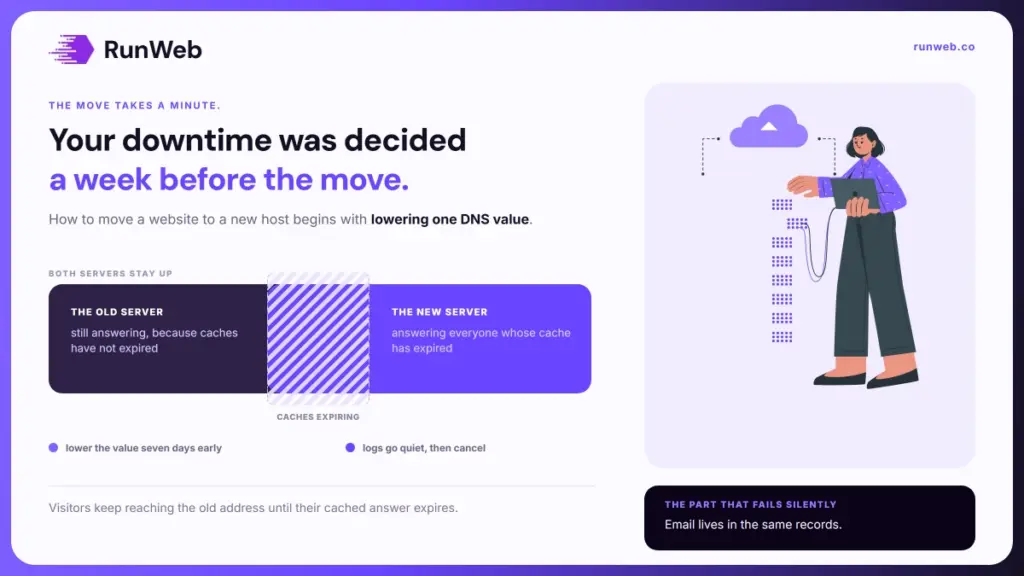
- Both servers stay live through the changeover, because visitors reach them in different orders
- Email breaks more moves than the website does, and it breaks silently
- The old plan gets cancelled last, once the logs show nobody is still arriving there
A host move goes wrong a week before it happens.
The copying takes an afternoon and the switch takes a minute. What decides whether a customer ever notices is a small number sitting in your DNS records, and almost nobody changes it in time.
Owners who skip it usually get away with it, then tell the story about the two days their phone stopped ringing. Nothing failed. The internet was simply still pointing half the traffic at a server they had already emptied.
So the sequence below starts seven days out, and the actual move sits near the end of it.
What actually breaks
Very little breaks in the way people expect. The pages arrive intact and the design survives. Everything that causes trouble sits in the connections between components, which is also why the trouble is so hard to anticipate.
So it helps to separate three things owners tend to treat as one. The domain, the hosting and the email can each live with a different company, and moving one does not move the others.
| What it is | Who holds it | What a host move does to it |
|---|---|---|
| The domain name | A registrar | Nothing, unless you also transfer it |
| The DNS records | Whoever runs the nameservers | One record changes, and that record is the move |
| The website files and database | The hosting company | Copied, then served from somewhere new |
| The mailboxes | Often the old host, quietly | Can stop delivering the moment the records change |
| The security certificate | The host, usually free | Needs reissuing on the new server before the switch |
Row four is where most of the pain lives, and we come back to it. Row two is the one that decides how long the whole thing takes.
The setting that decides your downtime
That DNS record carries a value called the time to live, and it is the closest thing this job has to a dial. It tells every network holding a copy of your address how long to keep trusting it before asking again.
A long time to live is why some visitors reach the new server within minutes and others keep landing on the old one for two days. Nothing is broken. They are reading a cached answer that has not expired yet.
Google’s guidance on changing hosting is direct about the fix. Lower the value to something conservative, a few hours for example, at least a week ahead of the move so caches refresh faster when the change lands.
- Seven days out, lower it: Drop the value to an hour or two, and leave the record otherwise untouched.
- Wait out the old value: The old setting has to expire on its own before the new short one takes effect anywhere.
- Restore it afterwards: Semrush’s migration checklist says to revert the value to normal once the move is done, since a permanently short setting costs you lookups.
Skip step one and nothing dramatic happens. You simply lose the ability to control when the change finishes, and the tail can run well past a working day.
Testing the copy before anyone sees it
So while that value is expiring, the copy gets built and tested. Google’s guidance is to upload a duplicate of the site to the new provider and confirm everything functions before any traffic is sent there.
- Build it somewhere private: A testing environment with restricted access, or a temporary hostname, lets you click through the whole site unobserved.
- Keep the test copy out of search: Where public testing is needed, Google says to apply noindex rules so the duplicate never gets indexed.
- Check the firewall is not blocking Googlebot: New hosts often arrive with denial of service protection switched on, and it can shut the crawler out silently.
- Confirm the crawler can reach it: The URL Inspection tool in Search Console will tell you whether Googlebot can fetch the new infrastructure.
- Carry the verification across: Any verification file, meta tag or analytics tag has to exist in the new copy, or you lose your own reporting at the worst moment.
Testing the thing you moved for
Because most moves happen for speed, this is the moment to confirm the new server is actually faster. Measure the time to first byte on the temporary address, since time to first byte counts the DNS lookup, the connection and the server’s own thinking before a single byte reaches the browser.
Most sites should be aiming at eight-tenths of a second or better. And where the audience sits far from the server, Ahrefs explains how a content delivery network holds copies around the world so visitors connect to something nearby instead.
The cutover, in order
Once that copy passes, the switch itself is four steps and they only work in this sequence. Doing them out of order is what produces an error page instead of a website.
- Take a backup you have restored from: An untested backup is a hope, so extract one file from it before you rely on it.
- Remove the blocks: Password protection, temporary robots rules and noindex tags all come off before the records change, never after.
- Change the record: Point the DNS at the new address, which is the entire move as far as the internet is concerned.
- Leave the old server running: Both hosts serve the site while caches expire, and Google’s advice is to watch the logs on old and new together.
Step four is the one people find counterintuitive. You are paying two hosts for a few days on purpose, because the alternative is a proportion of your visitors meeting nothing at all.
And timing helps as well. Semrush suggests moving during a quiet stretch, which for a trade business means a weekday evening rather than a Monday morning.
Email is the part that catches people
And this is where an otherwise clean move turns into a week of confusion. Email fails quietly, so nobody reports it, and you find out when a customer mentions they never got a reply.
And the cause is dull. Mail routing lives in the same DNS zone as the website, so changing nameservers wholesale can carry the mail records away with it.
- Write down every existing mail record before you touch anything, including the ones you did not know were there.
- Move the records deliberately, or change only the single address record and leave the nameservers where they are.
- Send and receive a test message from an outside account before you tell anyone the move is finished.
- Check the spam authentication records survived, since mail that quietly starts failing those lands in junk folders instead of bouncing.
None of that is difficult, and all of it is invisible if you do not check. The website announces its own failures. Mail does not.
When it is safe to cancel the old plan
That leaves one last decision, and the usual instinct is to cancel too early. The old plan is inexpensive insurance for a fortnight.
Both sources land in the same place. Google’s position is that the old hosting comes down only after traffic to it has stopped and Googlebot is operating normally against the new one. Semrush frames the identical point around indexing, saying the old plan can go once Google has finished indexing the new site.
What to watch before you cancel
Because both signals take days rather than hours, patience costs less than a restore does.
- The old server’s logs go quiet: Real visitors have stopped arriving there, which is the clearest single signal.
- Crawling recovers: Expect a short dip after the change, then a climb back over several days.
- Index coverage holds: Search Console’s reports should look the same before and after, with no new errors appearing.
- Speed measured again: Take a second reading now that live traffic is hitting the new server rather than a test copy.
Then the move is done, and the only thing left is the ongoing arrangement behind it. What the new tier costs to run is broken out in what hosting costs, what a monthly plan covers sits in a care plan, and the way to confirm nothing slipped is in checking the work.
Where a move is really the first step of a rebuild, the order of that larger job is set out in the redesign checklist, how long it runs is in the redesign timeline, and whether yours is due at all sits in when to redesign. When you would rather hand over the hosting, the move and the monthly care as one arrangement, that is how our websites service is set up.
Frequently Asked Questions
Do I have to transfer the domain as well?
Leaving it with the current registrar is usually simpler. One record points the name at the new server, and keeping the registrar separate means a future host change touches one setting.
Will my search rankings drop?
Addresses stay identical, so there is nothing for Google to remap. A slower new server or a blocked crawler can cause trouble, which is why both get checked beforehand.
How long does the whole thing take?
Plan a week for preparation and an evening for the switch. Full propagation runs anywhere from an hour to two days, depending entirely on the value you set beforehand.
Can I do it without a developer?
Many hosts run the copy for free as part of onboarding. The parts worth supervising are the mail records and the certificate, because those are the ones nobody tests.
What if something goes wrong halfway?
Point the record back at the old server and wait for caches to catch up. Keeping the old plan alive is what makes that reversal possible at all.