🎯 Key Takeaway
- Asking why does my website say not secure is a question about the connection, and almost never a sign that the site is infected
- Four separate faults produce that same label, and the repair is different for each one
- Certificates lapse more often than they used to, because the maximum life dropped to 200 days in March
- A broken certificate stops visitors with a full-page warning, where plain unencrypted pages only earn a grey label
- From October, Chrome asks permission before loading any public site that has no encryption at all
The warning is about the connection, not about your company.
Owners who see it for the first time usually assume the site has been hacked. What the browser is reporting is narrower and duller than that, and the good news is buried in how narrow it is.
But it still costs you, because a customer reading that label has no way to know it means something dull. And four different faults print those same two words, so the advice you find online contradicts itself depending on which one the writer happened to have.
So the useful first step is working out which of the four you are looking at.
What the label actually means
Your browser is answering one question before the page finishes loading, and the question is whether the traffic between the visitor and your server is encrypted. When it is, you get a padlock or nothing at all. When it isn’t, Chrome prints Not secure in the address bar and leaves it there.
Encryption is the whole of it. The check says nothing about whether your content is accurate, whether your business is legitimate, or whether anyone has tampered with your files.
| What a visitor assumes | What the browser checked |
|---|---|
| The site has a virus | Nothing. Malware is a separate warning with different wording |
| The business is a scam | Nothing. No identity check happens at this level |
| My card details will be stolen | Closer. On an unencrypted page anything typed travels in the open |
| Someone hacked the website | Nothing, though a lapsed certificate can follow a neglected server |
Row three is the only one the label earns. Semrush describes the split plainly in its guide to HTTP and HTTPS, where encrypted pages show a padlock and unencrypted ones carry the Not secure warning instead.
The four faults behind one warning
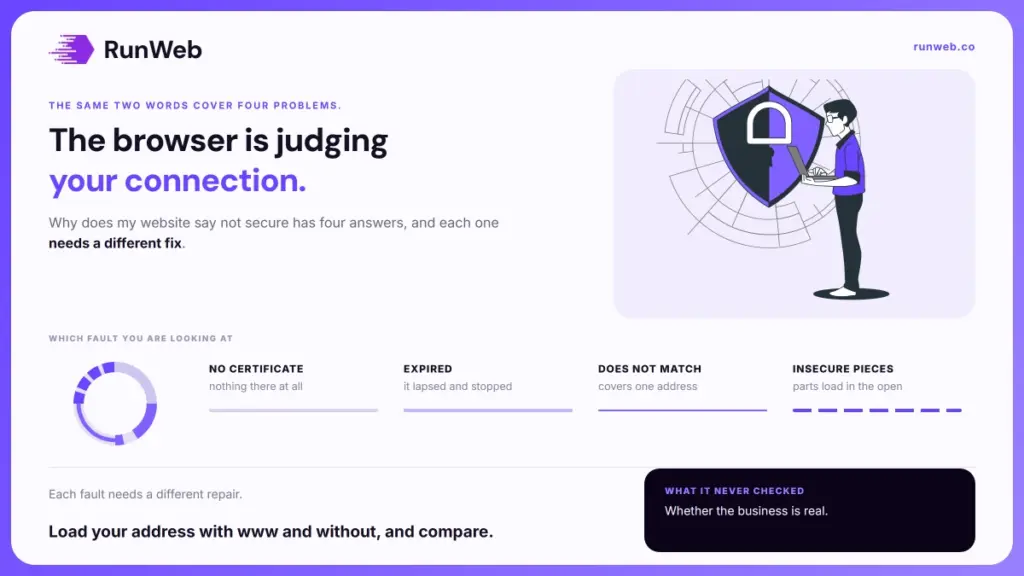
Because the browser reports the symptom rather than the cause, the same two words cover four unrelated problems. Each one needs a different person to fix it, which is why generic advice so rarely works.
- There is no certificate at all: The site is served over plain HTTP and always has been. Common on older sites built before encryption was standard, and on pages nobody has touched in years.
- The certificate expired: One existed, it lapsed, and nothing renewed it. The most common fault by a distance, and the one covered later on.
- The certificate does not match the address: It covers your domain but not the www version, or the other way round, so half your visitors see a warning and half do not.
- The page loads insecure pieces: The page itself is encrypted, but an image, a script or a stylesheet is still being pulled over plain HTTP.
Fault four has a name worth knowing, since it is the one that survives a certificate purchase and leaves owners convinced they were sold nothing. Google’s own guidance on mixed content separates it into two kinds, and the distinction decides how visible the damage is.
Passive pieces are images, video and audio, and browsers mostly let those through while downgrading what the address bar says. Active pieces are scripts, stylesheets and frames, and most browsers block those outright, which is how a page ends up loading with its layout collapsed.
Why certificates lapse more often now
That second fault used to be an annual worry, and it has quietly become a seasonal one. Certificates are issued with a fixed life, and the maximum has been falling on a schedule agreed between the certificate issuers and the browser makers.
The rule changed in March. Under the schedule the CA/Browser Forum adopted, the maximum life dropped to 200 days on 15 March 2026, falls to 100 days in March 2027, and reaches 47 days in March 2029.
Plenty of published advice still says a certificate lasts a year. It did once, and a reminder set on that assumption now runs out roughly five months after the certificate already has.
Shorter lives are a security improvement, because a stolen certificate stays useful for less time. What they change for a small business is the failure rate, since every renewal is another chance for a lapsed card or an unmonitored mailbox to end the job quietly.
Automatic renewal is the answer. Most hosting includes it now, though it’s worth confirming rather than assuming, because renewal that runs automatically still fails when the billing behind it does.
When visitors get blocked instead
Once a certificate does lapse, the cost changes shape. A site with no certificate gets a grey label that most people walk past, while a site with a broken one gets a full-page interstitial the visitor has to click through.
- No encryption anywhere: Not secure sits in the address bar, the page loads normally, and a proportion of visitors never notice.
- An expired or mismatched certificate: The page does not load. A warning screen appears first, and continuing takes two deliberate clicks.
- Blocked active content: The page loads with parts missing, so forms stop submitting and layouts break with no explanation on screen.
- Search crawlers: Unaffected by the warning screen, which is why the problem can run for weeks without your rankings moving.
The last point is the one that hides the bill. Crawlers don’t see the warning screen. Ahrefs notes in its migration guide that when a certificate expires, bots are passed while users receive an error message, so nothing in your reporting announces what is happening.
Meanwhile the enquiries stop. Traffic stays flat, the phone goes quiet, and the two facts look unrelated until somebody opens the site on their own phone. Because the dashboards stay calm throughout, the habit of checking if SEO is working from outside your own analytics is what catches it.
What changes in October
That grey label is about to stop being a label. Google has published the schedule already, so the date is not a prediction.
| Release | Who it affects | What a visitor sees on an unencrypted site |
|---|---|---|
| Chrome 147, April | Anyone using Enhanced Safe Browsing | A permission prompt before the page opens |
| Chrome 154, October | Everyone, by default | The same prompt, asking before the first visit to any public site |
Google set out the reasoning when it announced HTTPS by default, and the honest reading of its own figures is that this affects very few sites. Adoption already runs near 97% on Linux and above 99% on Android and Mac, so the change is a tidy-up rather than an emergency.
But the small remainder is exactly who is reading this. If your site is in that percentage, a warning most visitors ignored becomes a question they have to answer before they ever see your homepage. Sites that old are often due work anyway, and the encryption fix usually rides along inside a planned rebuild rather than standing as a job of its own.
What to send your host
None of the four faults needs a rebuild. Three of them are a support ticket, and what makes the ticket work is naming the fault instead of describing the symptom, because “my site says not secure” is where these conversations usually stall. The same question comes up when moving to a new host, since the certificate has to be re-issued at the far end.
- Check which fault you have: Open the site, click the warning in the address bar, and read whether it names an expired certificate or simply says the connection is not private.
- Test both versions of the address: Load your domain with www and without. A warning on only one of them is the mismatch fault and nothing else.
- Ask the one useful question: Does this domain have a valid certificate covering both the bare domain and the www version, and is automatic renewal switched on for it.
- Ask for the redirect too: Every unencrypted address should send visitors to the encrypted one, so the old links people have saved still arrive somewhere safe.
- Then recheck the pages, not just the homepage: Mixed content hides on interior pages, usually on whichever one carries an old embedded map or video.
What it should cost
Almost nothing, and that surprises people who were quoted otherwise. Most hosting bundles one free. So the honest answer for the majority of small sites is that the fee already sits inside the plan you pay for, which is set out in what a care plan covers and again across the package tiers.
Where it does cost is attention. Because renewals now come round twice a year and will come round more often after that, somebody has to own the calendar, and if nobody does the warning comes back. Our hosting and websites service keeps that side running so the question stops arriving.
Frequently Asked Questions
Does the warning hurt my Google rankings?
Encryption is a positive signal, so an unencrypted site is mildly disadvantaged. The larger cost is behavioural, because visitors who turn back never become the engagement that rankings are built from.
Can I just ignore it if I take no payments?
Less safely than it sounds. Contact forms, logins and search boxes all send text in the open on an unencrypted page, and the browser prompt arriving in October applies whether or not you sell anything.
Why does it only happen on some pages?
Usually an old embed. One image, map or video still loading over an insecure address is enough to change what the browser reports for that page alone.
My host says the certificate is fine. What now?
Ask them to confirm it covers both the www and non-www address, then check an interior page rather than the homepage. Those two checks account for most disagreements of that kind.
Will a padlock make customers trust me?
Its absence costs far more than its presence earns. Almost every site has one now, so it reads as normal, and only the sites missing it stand out.