🎯 Key Takeaway
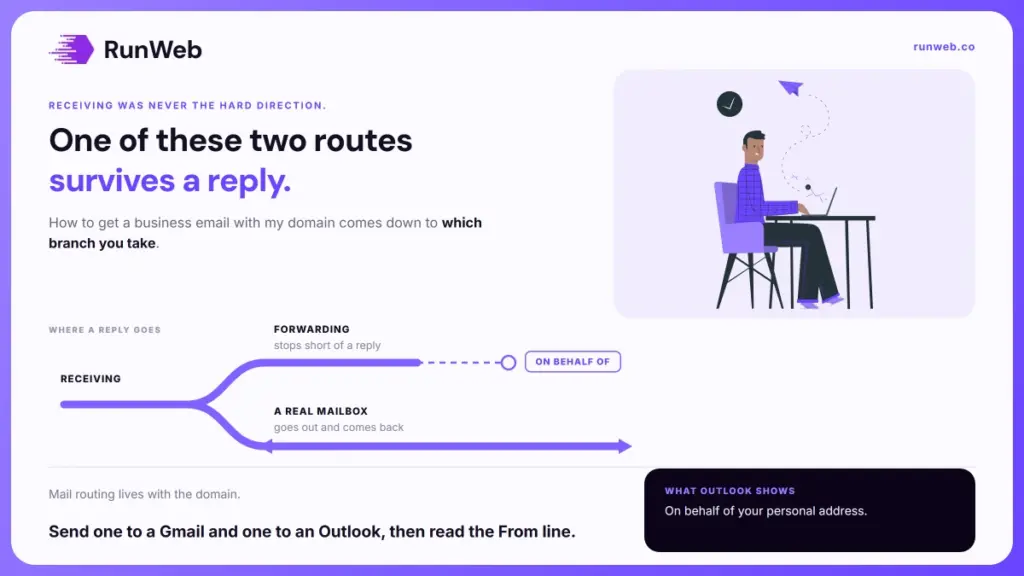
- Working out how to get a business email with my domain starts with a fork, and only one branch survives a reply
- Forwarding delivers mail to you, and says nothing about what address your replies go out from
- Recipients using Outlook can see “on behalf of” your personal address, which is the leak nobody tests for
- Mail routing lives in your domain’s DNS at the registrar, not with whoever hosts the website
- Gmail stops supporting Send as for third-party addresses in January 2027
You almost certainly own the hard part already.
If you have a domain name, the address is yours to create, and nothing else has to be bought first. Owners tend to assume there is a product called business email sitting somewhere behind a sales call, when what exists is a setting and a choice between two routes.
But the two routes are not equally good, and the cheap one fails in a place you never look. It works perfectly while you read mail and breaks the moment somebody answers you.
So the fork is worth understanding before you set anything up.
What you already own
Both routes start from the same asset, and your domain is the only prerequisite. HubSpot’s guide to building a professional email address puts that purchase first for exactly the same reason, because everything after it is configuration rather than shopping.
What the domain gives you is the right-hand side of the address. Anything before the at sign is yours to invent, in any quantity, at no extra cost per address in most arrangements.
- The domain is the asset: Own that and every address ending in it belongs to you by default.
- The website is unrelated: Mail and pages are separate services and can sit with completely different companies.
- Addresses are not individually purchased: What providers charge for is mailboxes, so aliases and forwarders are usually free.
- It dies with the domain: Let the registration lapse and every address goes down with it, which is one stage of when a domain expires.
That last point is the one worth sitting with. Because the domain underpins both, a lapse takes your website and your email in the same hour, and the recovery policy that governs the aftermath assumes you noticed.
The fork, and which branch you are on
Once the domain is in hand, two routes lead to mail sitting on it, and they look identical from your side of the screen. Both put your address on the card. Only one behaves like a real mailbox.
| What you want it to do | Forwarding plus send-as | A real mailbox |
|---|---|---|
| Receive mail at your domain | Yes | Yes |
| Cost | Usually nothing | A monthly fee per person |
| Replies leave from your domain | Sometimes, and not visibly to everyone | Always |
| Survives losing the personal account | No | Yes |
| Staff can be added or removed | No | Yes |
| Mail stays when someone leaves | No | Yes |
Those first two rows explain why the free branch is so popular, and the four beneath them explain why it keeps ending badly. Forwarding is a redirect, so the mail lands in a personal account that belongs to a person rather than to the business.
Why forwarding stops at the reply
Neither branch struggles with receiving. Sending is the hard direction, because your personal provider has to be persuaded to put somebody else’s domain in the From line, and it will only do that under conditions.
Google’s own documentation on sending from another address sets out what the arrangement costs you.
- You have to prove you own it: Gmail sends a confirmation message to the address and will not send as it until you click through.
- Some recipients see both addresses: People reading in Outlook and similar clients can be shown your personal address on behalf of your business one.
- Automated replies give it away: Out-of-office messages, filters and a full mailbox can all expose the underlying account.
- The route is being withdrawn: From January 2027, Gmail stops supporting Send as for third-party addresses such as Yahoo and Outlook.
The quiet damage is in point two. You will never see it, because it renders correctly in your own client and only misbehaves in somebody else’s.
Point four is narrower than it sounds, since it names third-party consumer domains rather than your own. But the direction of travel is the useful signal, and it points away from borrowing somebody else’s mailbox to carry your business name.
The record that actually moves your mail
That second branch changes where mail gets delivered, and the instruction doesn’t live with your provider. It lives in your domain’s own settings, which is why the step confuses people who expect the email company to handle everything.
Google’s setup notes describe the mechanism plainly. When somebody emails you, the sender’s computer looks up the MX records for your domain to work out where to deliver the message.
- The records sit at your registrar: You change them in the DNS settings where the domain was bought, not inside the mail provider.
- Your website stays where it is: Mail routing and page hosting are separate records, so moving one leaves the other alone.
- Changes are not instant: Google’s documentation allows up to 72 hours for new records to be recognised everywhere.
- Old mail does not follow: Anything already sitting in a previous inbox stays there unless you import it deliberately.
Because the records live with the domain, whoever holds that account controls your email as well as your website. That is worth settling before somebody else sets this up for you, since it is the same access question behind moving to a new host.
Picking the addresses before you make them
Once routing works, the remaining decisions are naming ones, and they are easier to get right at the start than to change later. HubSpot’s guidance is to build the address from a real name and to use separators sparingly, since periods and underscores scattered through an address read as spam to filters and to people.
- One personal address each: First name, or first name and surname, for anybody who deals with customers directly.
- One address the business owns: A general enquiries address that outlives whoever is currently answering it.
- Keep the count honest: Three addresses on a two-person firm looks like a two-person firm, and inventing departments fools nobody.
- Decide what happens when someone leaves: The answer is usually a forward to the general address, and it costs nothing to set up in advance.
The one to avoid
Skip the generic first address that names no person and no function. It attracts more automated mail than genuine enquiries, and a customer choosing between two firms reads it as nobody being home.
The test to run before you print it
All of that can be configured correctly and still be wrong in the one place that counts, which is what a stranger sees when your reply lands. Checking it takes about four minutes and needs no tools.
- Send from the new address to a Gmail account: Use one that is not connected to your setup, then read the From line as it appears there.
- Send to an Outlook account too: That is where “on behalf of” surfaces, and it is the one most likely to show a leak.
- Reply from that side and check it arrives: Delivery in one direction proves nothing about the other.
- Check the junk folder before deciding it worked: A new sending domain lands in spam often enough that a clean inbox is worth confirming rather than assuming.
- Then put it on things: Signage, vehicles, invoices and the website footer, once and consistently.
Where it usually goes wrong afterwards
The setup rarely breaks on its own. What breaks is the domain behind it, either through a lapsed renewal or through a host move nobody warned the mail about, and the encryption side has a similar failure mode in a not secure warning.
If you would rather the domain, the mail routing and the website sat in one account with one company answering for all three, that is what our websites and hosting service is built around. What the ongoing side covers is set out in care plan costs.
Frequently Asked Questions
Can I keep using Gmail if I switch to a real mailbox?
Most providers let you read business mail in the Gmail app while the account itself lives on your domain. What changes is ownership of the mailbox, not the software you open each morning.
How many mailboxes does a small team actually need?
One per person who answers customers, plus a shared enquiries address. Everyone else can usually sit behind a free forwarder rather than a paid seat.
Will switching lose the mail I already have?
Old messages stay in the old account unless you import them. Most providers include an import tool, and running it before you change the routing keeps the gap to nothing.
Does having email on my domain help my website rank?
Not directly, since search engines do not read your mailbox. The indirect effect is on whether people trust the address enough to write to it at all.
What happens to email if I move my website elsewhere?
Nothing, provided the mail records are left alone during the move. Problems start when a new host rewrites the whole DNS zone and takes the mail routing with it.