🎯 Key Takeaway
- The real boost post vs facebook ads question is not which tool performs better, since the two are built to buy different things
- Boosting buys attention on a post you already published, and it hands you very little control over who sees it
- Ads Manager buys an outcome, because you pick the objective, the audience and the placements before anything runs
- Boost when the asset is proven and the goal is visibility, and open Ads Manager when you need tracked enquiries
- A boosted post cannot be split-tested, so it will never tell you which offer or which audience was the one that worked
Boosting a post is the right move more often than most agencies will admit.
But it does one job, and that job has never been lead generation. The button sits a tap away from the post, it costs whatever you tell it to cost, and it reliably buys you reach.
That gap between reach and enquiries is the whole decision, because the two tools sit at different points in how Facebook sells advertising in the first place.
So here is what each one actually buys, and which of them your next few hundred dollars belongs in.
What the boost button actually buys
A boosted post is an organic post with money behind it. The post existed first, somebody wrote it for the feed rather than for a campaign, and boosting simply widens who gets shown it.
That origin explains every limit that follows. Because you are promoting something already published, HubSpot’s comparison of boosted posts notes they work directly from your timeline and leave you limited customizability when it comes to creating your ideal audience.
So the boost flow asks you three small questions, which are who roughly, how much per day, and for how long. Then it runs.
Why the ceiling is structural, not a setting
None of the missing control is hidden somewhere in the interface. It is absent because a boost has no campaign around it, and the campaign is where objectives and audiences live.
A boost cannot be split-tested, since you are promoting a post that already exists rather than building one to test against another.
Which means a boost can tell you that something got attention. It cannot tell you which headline, which image or which audience produced the attention, so nothing you learn from it transfers to the next one.
What Ads Manager adds
Ads Manager starts from the opposite end. You pick the result you want rather than the post you already have, and everything downstream gets optimised toward it.
Semrush’s walkthrough of Facebook advertising sets out the six current objectives as awareness, traffic, engagement, leads, app promotion and sales, with leads described as collecting leads for your business or brand. Campaigns hold ad sets, and ad sets hold the individual ads.
That three-level structure is the part worth understanding, because it is what lets you run one offer against several audiences and see which audience answered.
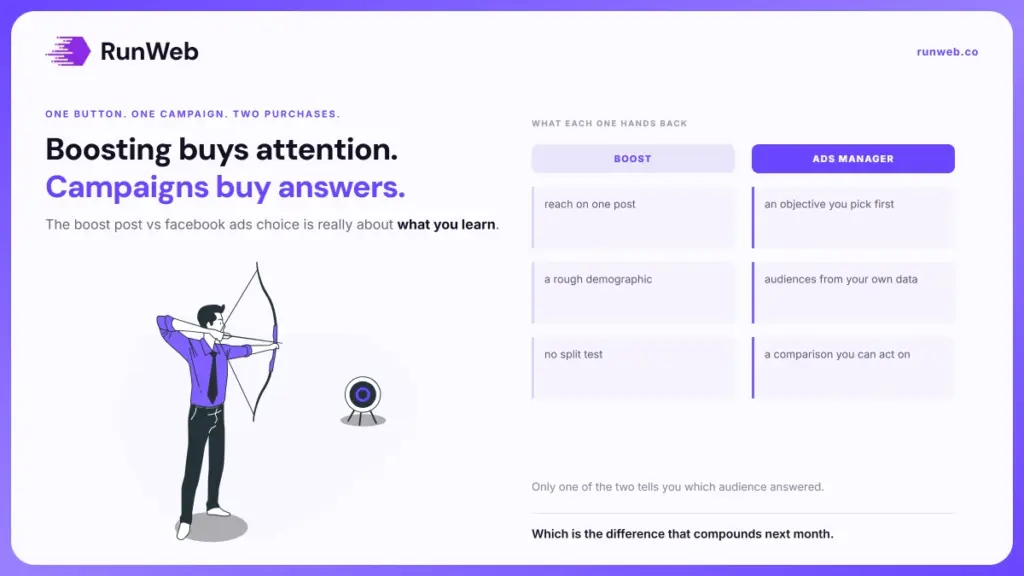
| What you control | Boosting a post | Ads Manager |
|---|---|---|
| Starting point | A post you already published | An objective you pick first |
| Audience | Broad location, age and interest | Custom and lookalike audiences from your own data |
| Where it appears | Feed placements tied to the post | Feed side ads, Messenger, Stories, Audience Network |
| Creative | Whatever the post already was | Carousels, written descriptions, a call-to-action button |
| Budget shape | A daily amount for a set run | Daily or lifetime across the campaign |
| Learning you keep | Reach and engagement on one post | Which audience and which creative won |
Read the right-hand column as work, not just as options. Each of those controls is a decision somebody has to make, and an empty Ads Manager account is harder to use well than a boost button.
The four differences that decide it
Most of the comparison collapses into four items. Everything else is detail that only matters once you are already spending monthly.
- Who gets reached: Boosting targets a rough demographic, while Ads Manager can build an audience from your customer list or your site visitors.
- What you are optimising for: A boost optimises toward engagement with a post, and a lead campaign optimises toward somebody completing a form.
- Where it can appear: HubSpot lists side ads, Messenger, Instagram stories, instant articles and the Audience Network as ad placements you choose, none of which a boost reaches on its own.
- What you learn: Boosts produce one number per post, whereas a campaign produces a comparison you can act on next month.
Notice that only the fourth one compounds. The first three change what this month costs, while the fourth changes what every following month costs, which is why it matters more than it sounds.
That same logic decides the other paid comparisons a service business faces, and Local Service Ads works the same way when the products differ in what they charge for.
When boosting earns its keep
Boosting has its place. It is a good tool for a narrow set of jobs, and refusing to use it costs small businesses real visibility. The trick is knowing which jobs those are before you press it.
- A post is already outperforming: Organic engagement told you the post works, so paying to widen a proven asset is the lowest-risk spend on the platform.
- You need to be seen locally this week: A one-off event, a seasonal reminder or a hiring notice needs reach in a tight radius, and nothing else gets there faster.
- Social proof is the actual goal: When a page looks abandoned, a busier page changes what a customer thinks before they call, even though nobody fills in a form.
- Somebody has to run it in five minutes: If the alternative is nothing happening at all, a boost beats an unopened Ads Manager account every time.
- You are testing whether an offer registers: A cheap boost on a plain offer post tells you if anyone cares, before you build a campaign around it.
Each of those shares one feature, which is that reach itself is the deliverable. And when the deliverable is a booked job instead, the same spend starts working against you.
When boosting is the costly choice
The expensive failure is not wasted budget. It is a year of small boosts that leave you knowing nothing you did not know at the start.
HubSpot’s own conclusion is blunt on where the line falls, describing boosted posts as helpful for raising awareness but not necessarily effective for converting customers or donors. Awareness and conversion are different purchases.
The pattern that hides the problem
Boosts produce flattering numbers, because reach and engagement always move when you pay for reach. Meanwhile the phone does whatever it was going to do, and nobody connects the two facts.
Once that runs for a few months, the spend gets defended by the metric it was always going to produce. So the question to ask of any boost is what it changed that you could count in the diary.
Objectives are the fix, and HubSpot’s list of campaign objectives runs to eleven across awareness, consideration and conversion. Picking one is what turns spend into a question with an answer.
Running a first test either way
Whichever route you take, the test only counts if you can tell afterwards what happened. Set the tracking up first. That means it goes in before the money does, rather than after the first invoice arrives.
Google’s documentation on analytics events is worth reading on one point in particular: custom events do not show up in most standard reports, so you need to set up custom reports or explorations. A form submission you never marked as a key event is a lead you cannot see.
- Decide the one number first: Booked jobs, or enquiries, or calls over ninety seconds, and write it down before launch.
- Give the test a fixed window: Seven days for a boost and about fourteen for a lead campaign, because a campaign needs volume before its numbers mean anything.
- Send traffic somewhere accountable: A page built to take the enquiry, not the homepage, since the ad cannot fix what happens after the click.
- Tag the links: Untagged traffic lands in your reports as direct, and then the channel gets blamed or credited at random.
- Write the stop rule now: Name what result would make you switch off, or the test will quietly become a subscription.
None of that is specific to Facebook, and the same five lines apply when the money goes to search instead. Where the budget is very small, the ordering problem covered in wasted ad budget matters more than the channel you pick, and Yelp Ads settles the same argument on a different pair of products.
The page the ad points at is usually the weakest link, which is why page count and the enquiry path deserve settling first. If organic is meant to carry the rest of the year, local search for trades covers what that needs, and checking whether SEO works covers how you would ever know.
When you would rather the enquiry page were built to convert before any of this spend starts, our website design work begins there.
Frequently Asked Questions
Can I promote an existing post from inside Ads Manager?
You can, and it is usually the better version of the same idea. Selecting an existing post as the creative inside a campaign keeps the social proof already on it while giving you the objective and audience controls the button withholds.
Does the button hurt my organic reach?
There is no penalty applied to a page for paying to promote its own content. What does happen is that paid reach flatters the page’s averages, so later organic comparisons look worse than they are.
How small a daily amount is still worth spending?
Very small daily amounts buy so little data that the result is noise, whatever the platform allows as a minimum. A useful floor is whatever gives you a few hundred people reached per day for at least a week.
Should a trades business bother with Meta at all?
Meta suits demand you have to create, like a seasonal service nobody is searching for yet. Urgent work gets searched for instead, so it belongs on search platforms where the intent already exists.
What happens to the results if I stop paying?
Paid reach ends when the money ends, on both routes. The engagement and any followers gained stay on the post, though neither keeps producing enquiries once the budget stops.